

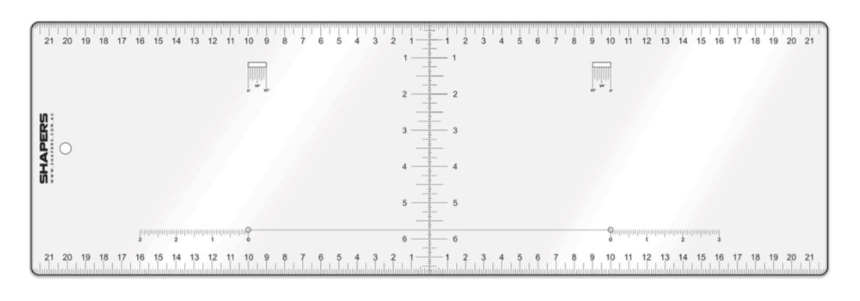

Shapers Pro Layout Square: Fin Placement
SKU:
14-0-4
Availability:
In Stock
- Rp 270,000
- Rp 270,000
- Unit price
- per
Shapers Pro Layout Square is the ultimate measuring tool and a essential tool for all Shapers!
- Transparent polycarbonate (Strong and Flexible Plastic), sits flat on surfboard blank
- Giving accurate centre-finding measurements from stringer to rail
- Measurements in inches
- Measure Nose, tail and Midpoint exactly with the printed measurements on the square
- Quick layout for Fin Positioning
- Also used for tail measurements and fin settings.
The Shapers Pro Layout Square - Dims
- 22" in width
- 7" in Height
Surfboard Fin Tow Angle Markings – Measurement Guide
A. Mark Fin Position on Stringer
Measure and mark the location on the stringer where each fin will be positioned, starting from the tail of the board.
B. Mark the “Shapers Dot” (Fin Trailing Edge Distance from Rail)
Align the Shapers Pro Square with the mark on the stringer, keeping it parallel. Slide it left or right until the desired trailing edge distance from the rail is aligned with the 0" reference hole. Mark a dot through this hole — this is known as the “Shapers Dot.”
C. Set Tow-In Angle
To mark the tow-in angle, use the top cut-out on the Pro Square. Each increment between the 0” reference point and the tow-in marks (e.g., 1/4", 3/8", 1/2") represents a 4.5" span along the square. Mark the desired tow-in position accordingly, ensuring accuracy from the Shapers Dot.

Related Products
Example product title
- Rp 270,000
- Rp 270,000
- Unit price
- per
Example product title
- Rp 270,000
- Rp 270,000
- Unit price
- per
Example product title
- Rp 270,000
- Rp 270,000
- Unit price
- per
Example product title
- Rp 270,000
- Rp 270,000
- Unit price
- per
Example product title
- Rp 270,000
- Rp 270,000
- Unit price
- per
Example product title
- Rp 270,000
- Rp 270,000
- Unit price
- per
- Choosing a selection results in a full page refresh.